


Filling in your tax return doesn't have to be a bogeyman.
Get these dates straight: between April 1 and June 30, 2025, all taxpayers must submit the Model 3 declaration for 2024 income online. Don't know how?
Follow this guide to avoid fines, secure a faster refund and ensure that no deductions, such as your professional association fees, are left behind.

1. IRS calendar 2025: key dates not to be missed
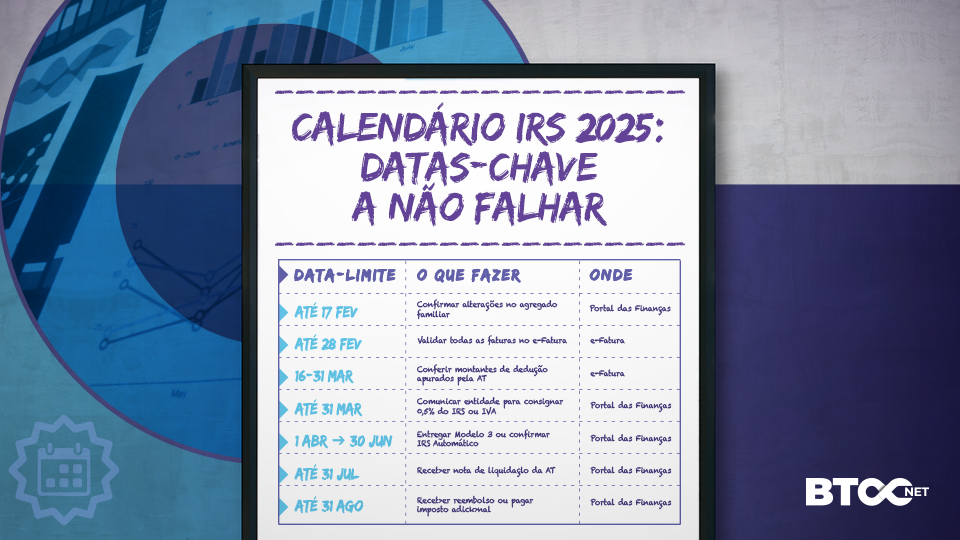
Quick tip: activate the electronic notifications on the Finanças website to receive alerts about these steps!
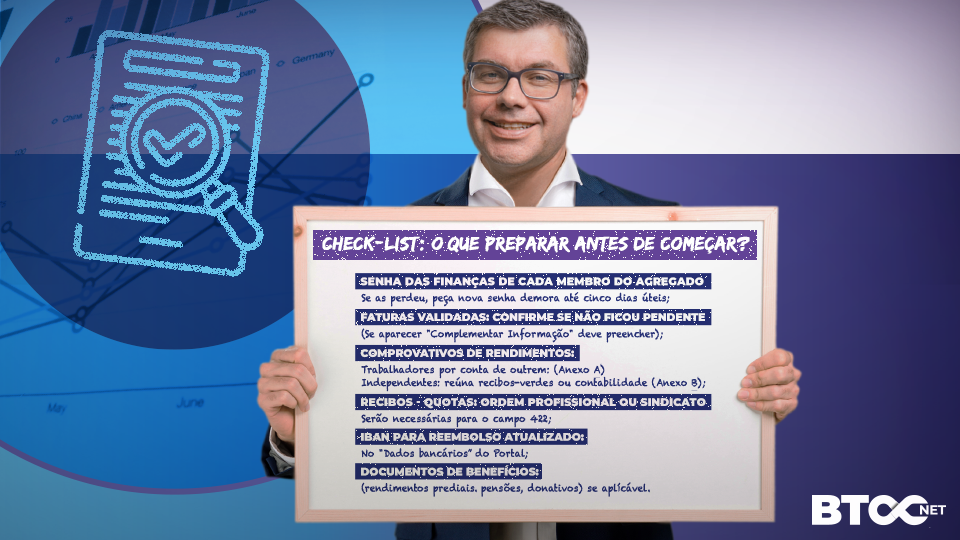
2. Checklist: what to prepare before you start?
- Passwords for each member of the household. If you've lost them, ask for a new password - it takes up to five working days;
- Validated invoices: check that no outstanding invoices have been left (if "Supplementary Information" appears, fill it in);
- Proof of income:
- Employees: declare income and withholdings from the employer's annual declaration (Annex A)
- Self-employed: gather green receipts or accounts (Annex B) - Dues receipts from your professional association or trade union - these will be needed for field 422;
- IBAN for reimbursement, updated in the "Bank details" section of the Portal;
- Benefit documents (property income, pensions, donations) if applicable
3. Step-by-step to fill in the IRS 2025
A. Open Model 3
After logging in, choose Submit ► IRS ► Fill in. In Model 3:
- Confirm NIF, marital status and address;
- If you are married or unmarried, decide whether you want to be taxed jointly or separately (the option can influence the tax you pay);
- Indicate the IBAN for reimbursement.
Common mistake: leaving dependent positions blank - this leads to discrepancies that delay reimbursement!
B. Annex A - Dependent Work and Pensions
- Table 4A: income, withholdings and compulsory contributions are already pre-filled; compare with the employer's annual declaration;
- Field 401 vs. 403: 401 is for income in Portugal; 403 for foreign entities. Beware: filling in these fields incorrectly causes double taxation;
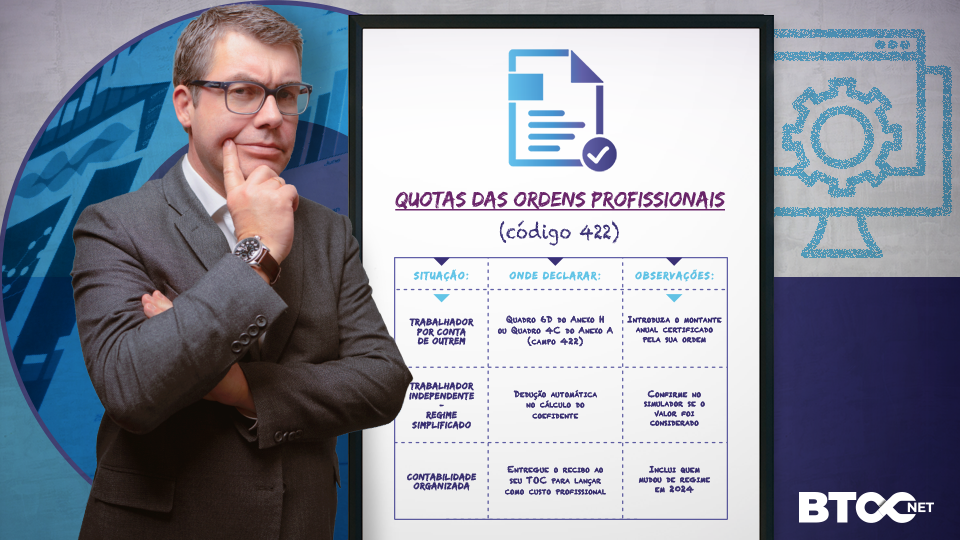
- Box 6D (specific deductions): here you will declare professional contributions if you are an employee.
C. Annex B - Self-employed
- Simplified regime: simply confirm income in Box 4; the order quotas are deducted automatically by applying the coefficients;
- Organized accounting: enter actual costs and attach the trial balance. Submit the fees to your TOC for inclusion as a professional cost.
If you switched from simplified to organized accounting in 2024, make sure you have indicated the correct economic activity code (CAE) so that the coefficient is not applied!
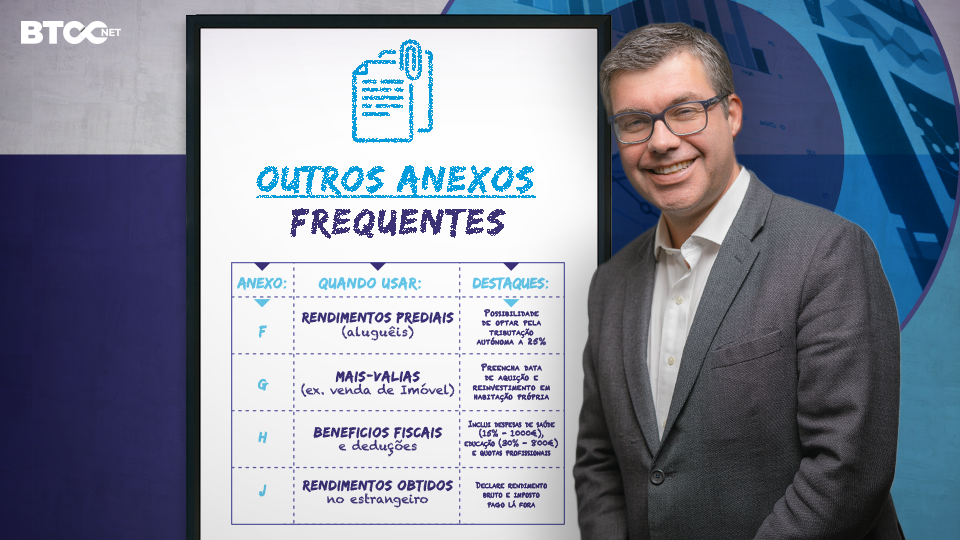
4. Other frequent IRS attachments
5. Automatic IRS: accept or reject?
If the AT makes IRS Automatic available, you will see an "Automatic declaration" shortcut on the home page. This applies to those who have only earned income from dependent work or pensions and have no deductions outside of e-Fatura, among other conditions.
- Check that your order quotas have been taken into account (they are not included by default). If not, refuse the automatic form and submit Model 3 manually;
- The provisional declaration becomes final on June 30 if you do nothing.
6. Deductions and tax benefits that make a difference
General family expenses, health, education and homes
- General expenses- 35 % up to 250 € per household;
- Health- 15% up to €1,000;
- Education- 30% up to €800 (up to €1,100 with a "displaced student");
- Homes- 25% up to 403 €
Quick tip: validate all invoices in e-Fatura by February 25 so that they appear pre-filled!
Dues for Professional Associations (code 422)
Membership fees paid to professional bodies or associations can be deducted from your tax bill, as indicated in the table below:
- No automatic IRS: if you accept the automatic declaration you lose this benefit - refuse and submit Model 3 manually;
- Legal basis: Article 25(4) of the CIRS;
- Typical savings: if you pay €180 in dues and find yourself at the 28% marginal rate, you get back €50.40 (180 × 28%);
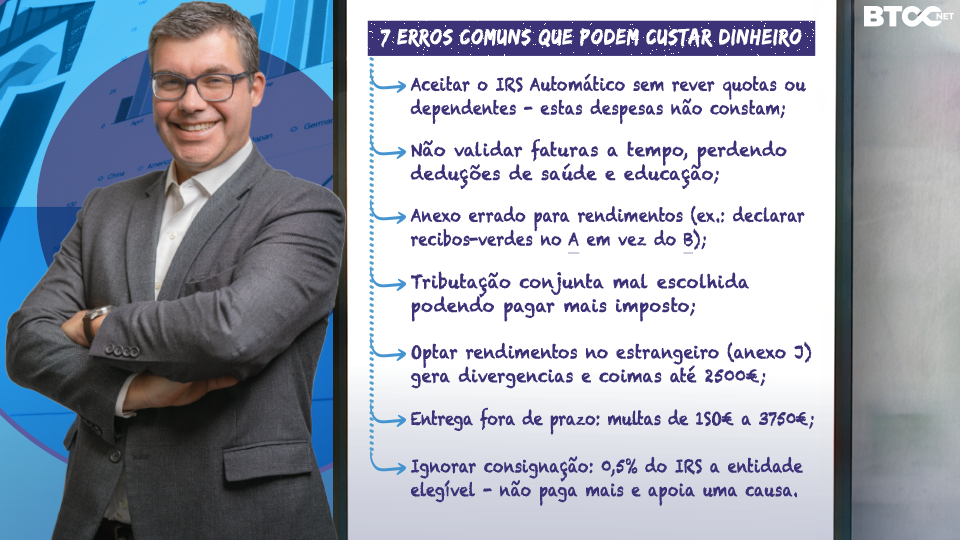
7. Common IRS mistakes that can cost you money
- Accept the Automatic IRS without reviewing quotas or dependents - these expenses are not included;
- Not validating invoices in time, losing out on health and education deductions;
- Wrong annex for income (e.g. declaring green receipts in A instead of B);
- Poorly chosen joint taxation, potentially paying more tax;
- Omitting income abroad (Annex J) - generates divergence and fines of up to €22,500;
- Late delivery: fines from €150 to €3,750;
- Ignore the consignment of 0.5% of the IRS to an eligible organization - you don't pay more and you support a cause.
8. After Submission: track the settlement note and reimbursement
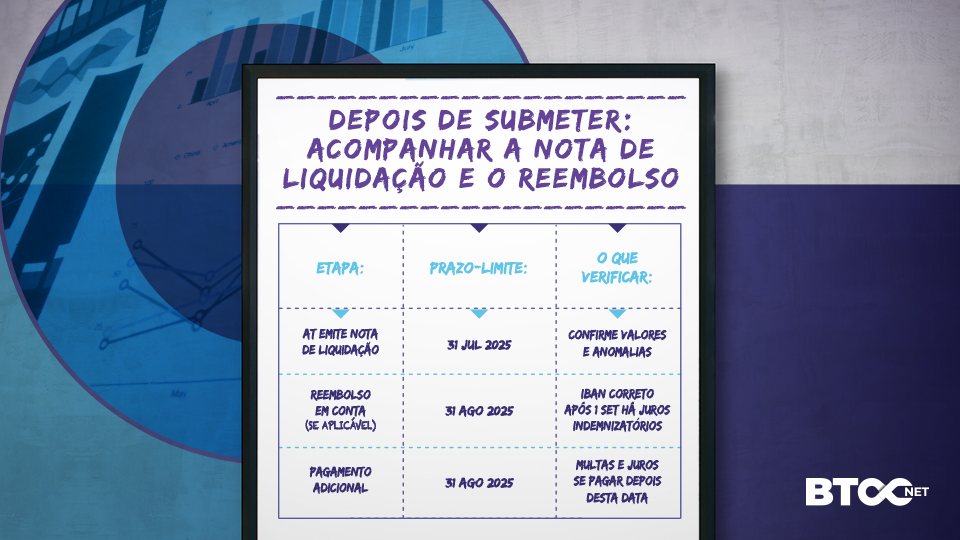
To keep track of the status, on the Finance Portal go to All Services ► IRS ► Consult Declaration; you will see statuses such as "Settlement processed" or "Refund issued".
9. FAQ - Frequently Asked Questions about the IRS
1.Can I correct the declaration once it has been sent?
Yes, you can submit a replacement declaration without additional penalty as long as you do so within 120 days of the tax payment deadline, under the terms of article 59 of the CPPT. The correction is made on the Finance Portal by choosing "IRS ► Submit ► Replacement return".
2.What are the fines for late delivery?
It depends on how much time has passed and whether the Tax Authority has been notified:
- Voluntary delivery up to 30 days after the deadline - minimum fine can be reduced to €25;
- After notification but before inspection - minimum €37.50;
- If there is an inspection procedure - minimum €112.50;
- Delay that is detrimental to the State or very long - fine of between €150 and €3,750 (plus charges).
3.How do I track my IRS refund?
- Log in to the Finance Portal with your NIF and password;
- Go to IRS ► Consult Declaration (or shortcut "Declaration Status");
- Select the year and check the possible statuses: "Declaration correct", "Settlement processed", "Refund issued", "Payment confirmed".
Conclusion
Filling in the IRS with confidence is possible - especially when you know the tricks of declaring the quotas in field 422 and avoiding the seven mistakes that delay refunds.
If you still need an expert review or to submit the entire tax return without stress, talk to us: BTOCNET has hundreds of certified accountants ready to optimize your IRS. Contact us via this link!

